
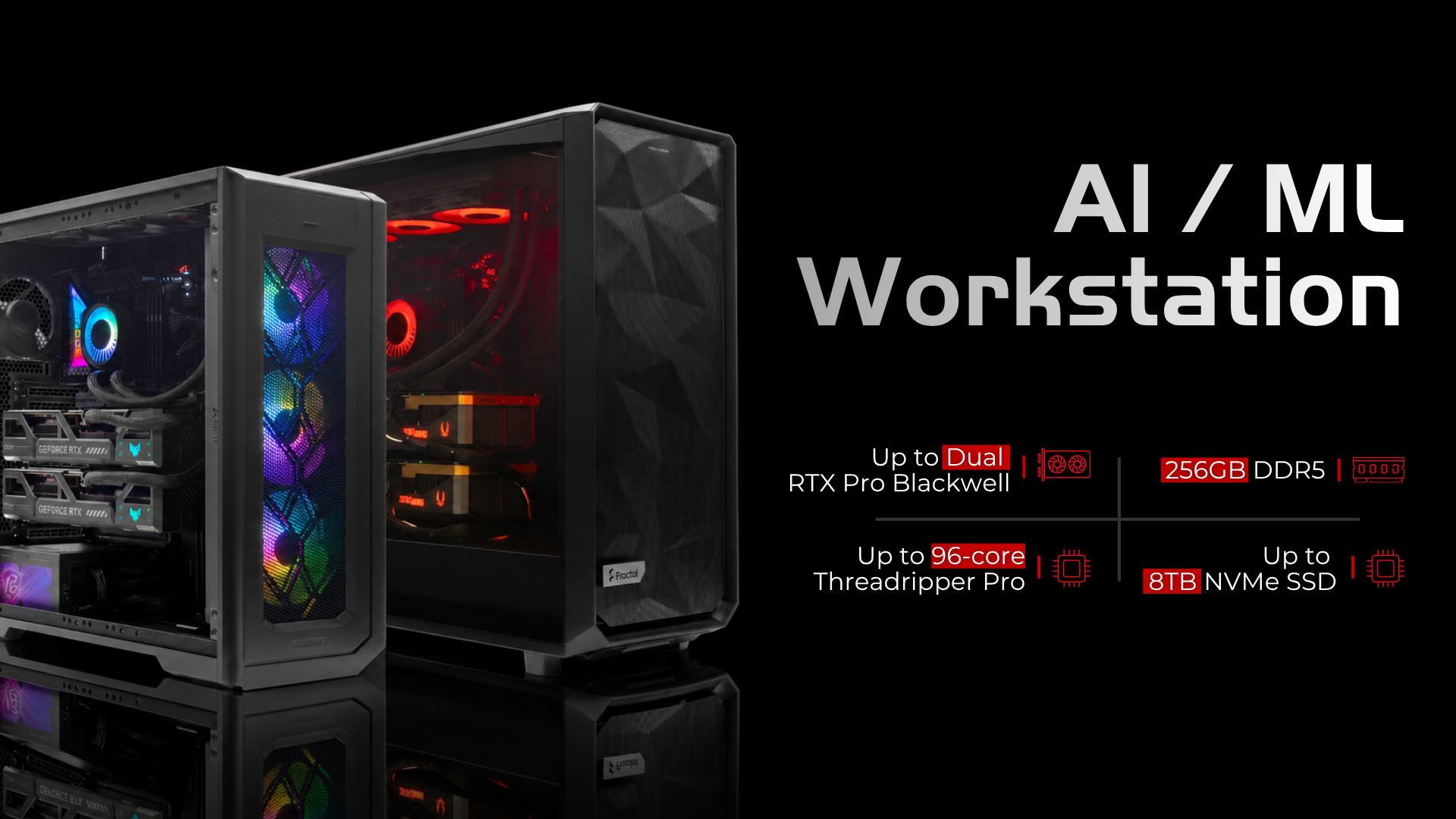

What Are the MES2X and ES620?
A dual GPU AI workstation can deliver serious compute power, but the case you choose can directly affect motherboard compatibility, PCIe bandwidth, cooling, and long-term upgrade flexibility. That is why the difference between our MES2X vs ES620 workstation configurations matters.
The MES2X and ES620 are two distinct workstation configurations we build here at ArsenalPC. On paper, both can house dual high-end GPUs and an AMD Ryzen processor on the AM5 platform. In practice, the case you choose determines which motherboard fits, and that motherboard choice determines how much PCIe bandwidth each GPU actually receives. That chain of decisions is the engineering story most builders skip over.
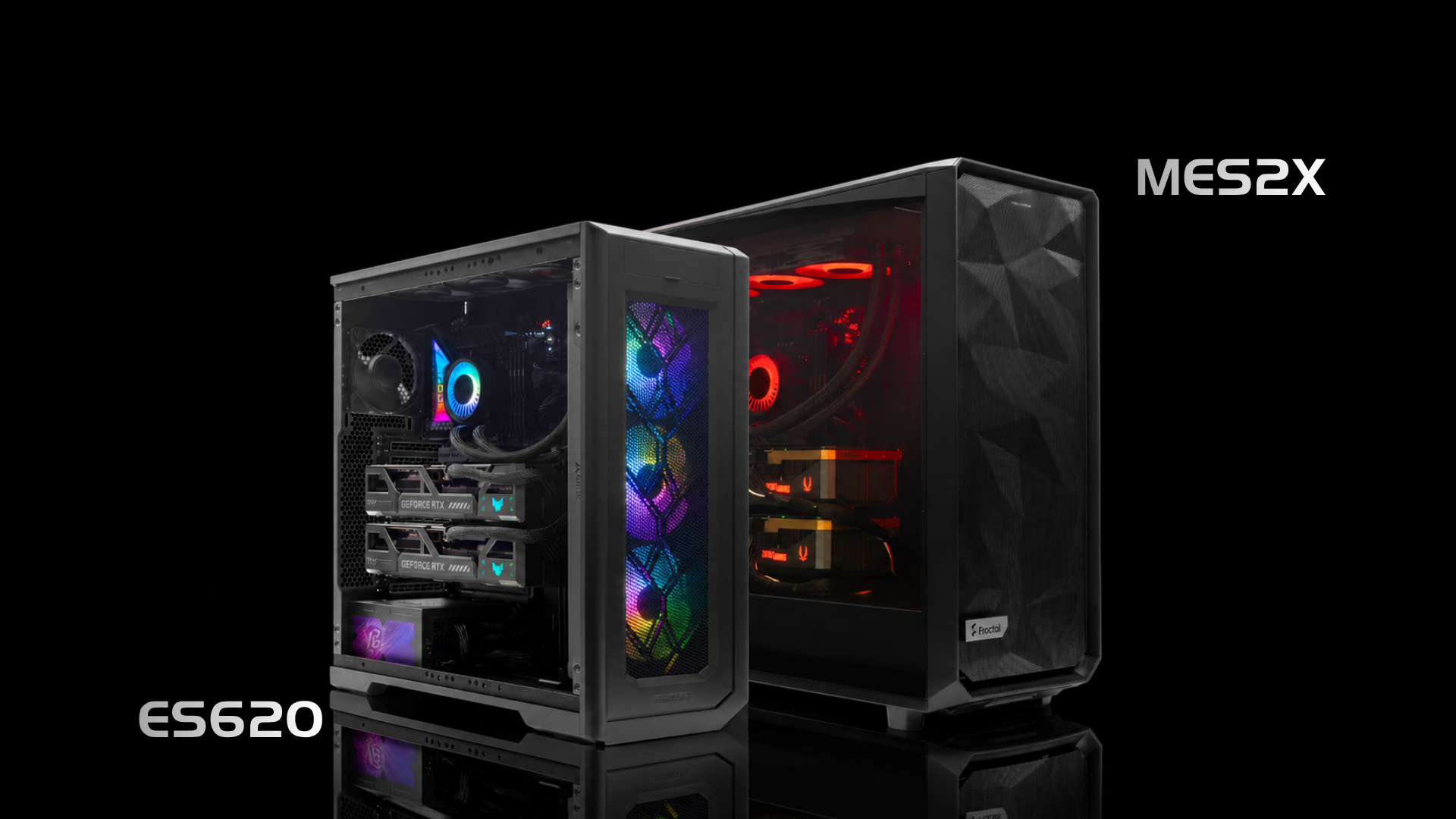
The MES2X is a compact, purpose-built workstation chassis. Its internal dimensions constrain motherboard selection to boards that fit within a tighter footprint. Based on the case specifications, the largest board we can reliably seat is the Gigabyte X870 X870 AORUS Elite WiFi7, a standard ATX board measuring 30.5 cm x 24.4 cm. It runs the AMD X870 chipset (not X870E) and supports Ryzen 9000, 8000, and 7000 series processors on the AM5 socket. It is a capable board for a single-GPU build, but its slot configuration becomes a limiting factor the moment you add a second GPU.
The ES620 is a larger tower with a more generous internal layout. That extra space is not incidental. It is what allows us to install the ASUS ROG Crosshair X870E Dark Hero, also an ATX board but built around the higher-tier AMD X870E chipset. ASUS explicitly positions the Dark Hero for dual GPU workloads, marketing it for “dual GPU support for intensive AI and rendering tasks.” The chipset and slot architecture back that claim up in a way the X870 Elite simply cannot.
Top Picks
Updated monthly
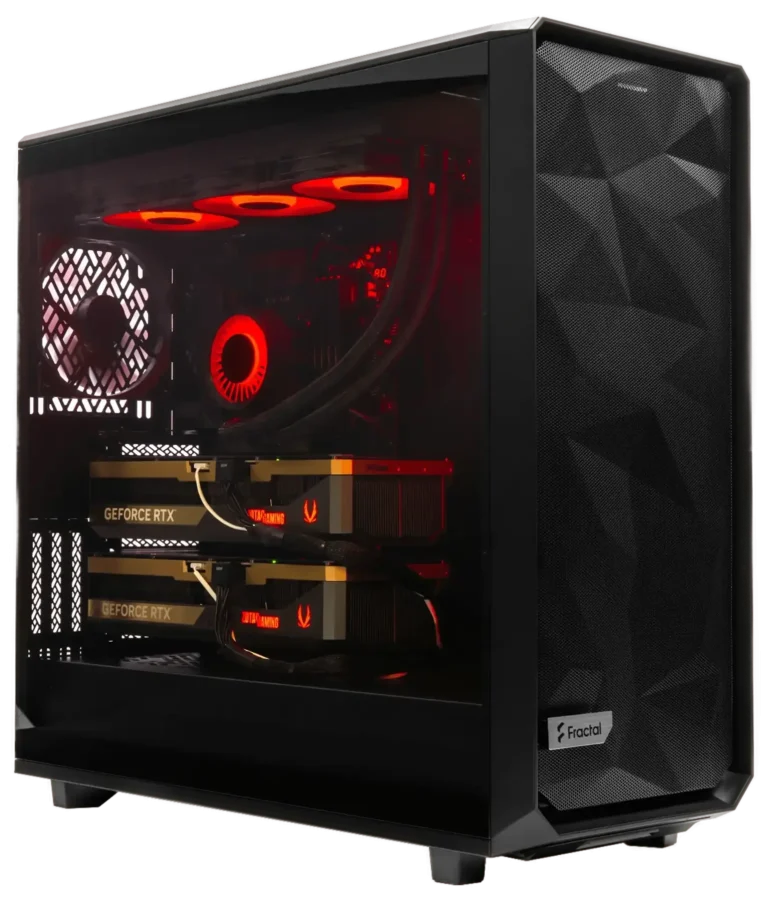
Best MES2X Build
Meshify 2XL Liquid Cooled Custom AI Workstation, RTX PRO 6000 Blackwell 96 GB, DDR5 256GB, Ryzen Threadripper PRO 9975WX 32C 4.0GHz, 8TB Premium NVMe SSD (2x4TB RAID)
The good
- 96 GB ECC GDDR7 VRAM fits full 70B FP8 models on a single card
- Ryzen Threadripper PRO 9975WX delivers 32 cores for heavy parallel CPU workloads
- 256 GB DDR5 system RAM supports large LLM context windows
- 8TB RAID NVMe storage for fast model checkpoint I/O
The trade-offs
- MES2X chassis constrains motherboard to X870 (non-E), limiting dual-GPU PCIe bandwidth
- Second GPU slot runs chipset-fed PCIe 4.0 x4 (~8 GB/s), not CPU-direct
- Premium price tier reflects Threadripper PRO platform costs
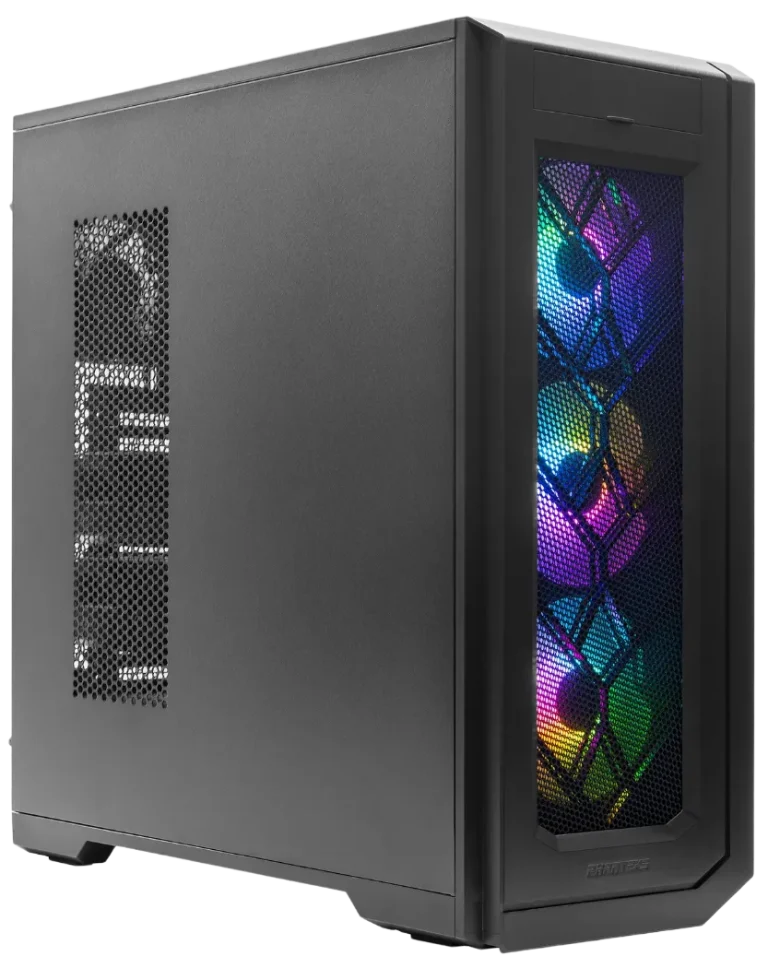
Best ES620 Build
Enthoo Pro 2 Server Edition Custom AI Workstation, Dual RTX 5090 GPUs, DDR5 256GB, Ryzen 9 9950X3D2 Dual Edition 16C 4.3GHz, 8TB NVMe SSD (2x4TB RAID)
The good
- ES620 chassis accommodates the ASUS ROG Crosshair X870E Dark Hero for true dual PCIe 5.0 x16 (x8/x8) CPU-connected slots
- Dual RTX 5090s deliver 64 GB combined VRAM for prosumer AI and rendering
- Ryzen 9 9950X3D2 Dual Edition brings 3D V-Cache to a 16-core platform
- More accessible price tier than dual Pro 6000 configurations
The trade-offs
- 32 GB per card limits single-card 70B FP8 model inference
- No NVLink, all inter-GPU communication over PCIe only
- RTX 5090 is a consumer card, not rated for 24/7 sustained workstation loads
- No ECC VRAM support
Why the Case Is the Real Decision
Most buyers focus on GPU specs or CPU core counts when configuring a workstation. The case rarely enters the conversation. With these two systems, the case is the decision. The MES2X locks you into the X870 AORUS Elite WiFi7 by physical necessity. The ES620 opens the door to the Dark Hero and the X870E platform. Everything downstream, including PCIe lane allocation, GPU-to-GPU bandwidth, and AI inference throughput, follows from that single constraint. We will walk through exactly what that means for a dual RTX Pro 6000 Blackwell build.
Motherboard Comparison: X870 AORUS Elite WiFi7 vs ROG Crosshair X870E Dark Hero
Both boards run AMD AM5 and support Ryzen 9000, 8000, and 7000 series processors, but they sit on different chipsets. The Gigabyte X870 AORUS Elite WiFi7 uses the standard AMD X870 chipset. The ASUS ROG Crosshair X870E Dark Hero uses the X870E chipset, which carries additional PCIe lane provisioning and is the platform AMD targets at high-end workstation and enthusiast builds.
Gigabyte X870 AORUS Elite WiFi7
MES2X Board
ASUS ROG Crosshair X870E Dark Hero
ES620 Board
VRM and Memory
The AORUS Elite ships with a 16+2+2 digital twin phase VRM. That is a capable design for a single high-core-count Ryzen CPU, and in our builds it handles a Ryzen 9 9950X without thermal throttling under sustained compute loads. The Dark Hero steps up to a 20+2+2 configuration using Infineon PMC41420 110A MOSFETs, totaling 2,220A of available current. The extra headroom matters when the CPU is sustaining full AVX-512 workloads alongside two GPUs pulling power through the same board.
Both boards support four DDR5 DIMM slots with AMD EXPO and XMP profiles. The AORUS Elite tops out at 256 GB and is rated to DDR5-8200 MT/s in overclocked mode. The Dark Hero matches that capacity ceiling with similar EXPO support. For AI inference workloads where system RAM supplements VRAM, both boards can hold 256 GB of DDR5, which is a practical ceiling for most local LLM deployments today.
Storage
The AORUS Elite provides four M.2 slots: three PCIe 5.0 x4 slots connected directly to the CPU, and one PCIe 4.0 x4 slot on the chipset. The Dark Hero offers five M.2 slots total, with two PCIe 5.0 x4 CPU-connected slots and three PCIe 4.0 chipset slots, though the fifth slot is limited to the 2230 form factor. One note from our bench work: the Dark Hero’s second PCIe 5.0 M.2 slot shares bandwidth with the onboard USB4 ports, so drive selection and port usage need to be planned together.
Networking and AI BIOS Features
Networking is where the gap widens for workstation use. The AORUS Elite includes 2.5 GbE wired Ethernet and Wi-Fi 7. The Dark Hero pairs a Realtek 10 GbE port with a separate Realtek 5 GbE port, plus Wi-Fi 7. For teams pulling large model checkpoints or streaming inference results across a local network, that 10 GbE port removes a bottleneck the AORUS Elite cannot address.
Both boards include dual USB4 40 Gbps ports on the rear I/O, with the Dark Hero adding five USB Type-C ports total at the rear panel. The Dark Hero also ships with ASUS’s AI Cache Boost BIOS feature, which ASUS rates at up to 29% faster local LLM performance on Ryzen 9000 series CPUs. We treat that figure as a best-case ceiling rather than a guaranteed result, but the feature is consistent with what we see in shop testing: Ryzen 9000’s cache architecture responds meaningfully to tuned prefetch and latency settings during tokenization-heavy workloads. The AORUS Elite has no equivalent feature. For ROG Crosshair X870E Dark Hero dual GPU support, that BIOS-level AI tuning is one more reason the platform is better matched to a serious inference build than the X870 alternative.
Why the PCIe Slot Layout Is the Deciding Factor for Dual GPU
Most case and motherboard comparisons stop at form factor and feature counts. The detail that actually matters for a dual GPU AI workstation on AM5 is which PCIe slots connect directly to the CPU and how much bandwidth each one carries. That distinction separates a true dual-GPU platform from one that only looks like one on a spec sheet.
X870 AORUS Elite WiFi7: One CPU Lane, One Bottleneck
The X870 AORUS Elite WiFi7 has a single CPU-connected PCIe 5.0 x16 slot. That is the only slot with a direct path to the processor. The second physical x16 slot runs through the chipset at PCIe 4.0 x4, which caps theoretical bandwidth to a second GPU at roughly 8 GB/s. A third slot runs at PCIe 3.0 x2, which is not a viable GPU lane at all. There is no x8/x8 bifurcation mode on this board because the CPU simply does not expose a second x16 lane to a second slot.
The chipset-fed slot carries an additional constraint: it shares bandwidth with the M2D_SB M.2 slot. Populate that M.2 slot, and the second PCIe slot becomes unavailable entirely. In a workstation build where NVMe storage is standard, that second GPU slot is effectively gone before the system even boots.
ROG Crosshair X870E Dark Hero: Two CPU-Connected Slots
The ROG Crosshair X870E Dark Hero takes a different approach. Both of its full-length PCIe x16 slots connect directly to the CPU, and the board supports x16/x16 or x8/x8 bifurcation with Ryzen 9000 and 7000 series processors. In x8/x8 mode, each slot delivers approximately 64 GB/s of theoretical bandwidth. That is the X870 vs X870E dual GPU PCIe lane difference in concrete numbers: 64 GB/s per slot versus 8 GB/s to a second card.
Both slots use reinforced SafeSlot brackets, which matters when seating cards as heavy as the RTX Pro 6000 Blackwell. ASUS positions this board explicitly for dual GPU use in AI and rendering workloads, and the slot architecture backs that positioning up.
Per-Slot Bandwidth (Dark Hero x8/x8)
Each CPU-connected PCIe 5.0 x8 slot on the X870E Dark Hero delivers ~64 GB/s, the bandwidth floor a legitimate dual-GPU AI workstation requires.
Second-Slot Bandwidth (AORUS Elite)
The X870 AORUS Elite’s second GPU slot is chipset-fed at PCIe 4.0 x4, capping theoretical bandwidth to a second card at roughly 8 GB/s, an 8x deficit versus the Dark Hero.
Bidirectional PCIe 5.0 x16 Ceiling
PCIe Gen 5 x16 delivers ~128 GB/s bidirectional, the hard ceiling for inter-GPU communication on both platforms without NVLink.
What This Means in Practice
For a dual GPU AI workstation on AM5, the PCIe bandwidth gap between these two boards is not marginal. A second GPU starved to 8 GB/s will bottleneck data transfers between cards, limit peer-to-peer communication, and reduce effective throughput in multi-GPU inference and training pipelines. We see this consistently in shop builds: the MES2X forces the X870 AORUS Elite WiFi7, and that board physically cannot support a legitimate dual-GPU configuration. The ES620 accommodates the Dark Hero, and the Dark Hero can. The case choice is the root cause, and almost no consumer-facing content explains that chain of decisions clearly.
GPU Options: Dual RTX 5090 vs Dual RTX Pro 6000 Blackwell
Both GPUs share the same Blackwell GB202 die on TSMC’s 4NP process, but they are not the same chip. The RTX Pro 6000 Blackwell is the fully enabled version, with 24,064 CUDA cores against the RTX 5090‘s 21,760. That 10.5% core advantage compounds across every parallel workload.
VRAM and Memory Architecture
The RTX Pro 6000 Blackwell vs RTX 5090 VRAM comparison is where the gap becomes decisive for AI work. Each RTX 5090 carries 32 GB of GDDR7 on a 512-bit bus at 1,792 GB/s. Each RTX Pro 6000 Blackwell carries 96 GB of GDDR7 ECC on the same 512-bit bus at up to 1,597 GB/s. Dual RTX 5090s give you 64 GB combined. Dual RTX Pro 6000s give you 192 GB combined.
Neither GPU supports NVLink. All inter-GPU communication runs over PCIe only, which is exactly why the slot configuration covered in the previous section matters so much. PCIe Gen 5 x16 delivers roughly 128 GB/s bidirectional, a real constraint for tensor parallelism compared to NVLink’s 900 GB/s on H100-class hardware.
Compute, AI Performance, and Workstation Features
The RTX 5090 delivers 3,352 AI TOPS. The RTX Pro 6000 Blackwell reaches 4,000 AI TOPS and 125 TFLOPS FP32. The Pro 6000 also carries hardware ECC across all 96 GB of VRAM, a requirement for many scientific and financial workloads where silent data corruption is unacceptable. The RTX 5090 has no ECC support.
- MIG support: RTX Pro 6000 Blackwell only. Up to four fully isolated instances, each with dedicated memory, cache, and compute cores. The RTX 5090 does not support MIG.
- TDP per card: RTX 5090 at 575W, RTX Pro 6000 Blackwell Workstation Edition at 600W.
- Generational context: Compared to the RTX 6000 Ada predecessor, the Pro 6000 Blackwell delivers up to 37% more FP32 throughput and up to 80% higher RT TFLOPS. These are generational improvement figures, not a comparison to the RTX 5090.
Workload Fit and Price Tier
Dual RTX 5090s suit high-throughput gaming, rendering, and inference workloads where 64 GB of combined VRAM is sufficient and ECC is not required. The platform sits in a significantly lower price tier. Dual RTX Pro 6000 Blackwell systems occupy a much higher tier, reflecting the 192 GB ECC VRAM pool, MIG partitioning, and the fully unlocked GB202 die. For large language model fine-tuning, multi-tenant inference, or any workload that demands memory integrity guarantees, the Pro 6000 configuration is the only option between these two builds.
What “No NVLink” Means for Your Workload
Neither the RTX 5090 nor the RTX Pro 6000 Blackwell supports NVLink in a desktop workstation configuration. All inter-GPU communication runs over PCIe. That fact matters differently depending on how your software actually uses two GPUs, and the distinction is worth being precise about.
Data Parallelism
Where PCIe Is Fine
Data parallelism means each GPU runs a separate, complete copy of a model and processes different batches of inputs simultaneously. The two GPUs rarely need to talk to each other mid-inference. In this pattern, PCIe bandwidth is largely irrelevant to throughput. Both the MES2X dual-RTX-5090 config and the ES620 dual-RTX-Pro-6000 config handle data-parallel workloads well.
Best for: two independent inference services, separate fine-tuning jobs, or A/B testing two model versions.
Tensor Parallelism
Where the Interconnect Becomes the Ceiling
Tensor parallelism splits a single large model’s weight matrices across both GPUs, requiring constant, high-frequency communication during every forward pass. PCIe 5.0 x16 delivers ~128 GB/s bidirectional; NVLink on H100 delivers 900 GB/s, roughly a 7x gap. In shop testing, the PCIe ceiling shows up as GPU utilization imbalance and stalled compute cycles waiting on weight transfers.
Best for: models too large for one GPU’s VRAM, though the Pro 6000’s 96 GB often eliminates the need for tensor parallelism entirely.
For the RTX Pro 6000 Blackwell specifically, a 70B parameter model at FP8 quantization requires roughly 70 GB of VRAM, leaving about 26 GB free for KV cache within a single card’s 96 GB. That means a 70B model fits on one GPU without tensor parallelism at all. The second GPU then handles a second concurrent session via data parallelism, which sidesteps the interconnect problem entirely.
The honest framing for dual RTX 5090 no NVLink workload limitations is this: at 32 GB VRAM per card, the RTX 5090 pair can tensor-parallel a model up to roughly 64 GB combined, but will pay a PCIe bandwidth tax doing it. The RTX Pro 6000 Blackwell pair at 96 GB per card rarely needs tensor parallelism for models under 192 GB, which covers nearly every currently available open-weight model. The Pro 6000 config avoids the bottleneck by making it unnecessary.
VRAM and LLM Inference: The 96 GB Advantage
The RTX Pro 6000 Blackwell carries 96 GB of GDDR7 ECC memory on a 512-bit bus, delivering up to 1,597 GB/s of bandwidth. That capacity number is the practical reason this card exists for AI workloads, and it changes what a single GPU can hold in memory without offloading or quantization compromises.
Combined ECC VRAM, Dual RTX Pro 6000 Blackwell in the ES620
Two RTX Pro 6000 Blackwell cards in the ES620 deliver 192 GB of hardware ECC GDDR7 across two CPU-direct PCIe 5.0 slots. That pool supports full 70B FP8 models on a single card, higher batch sizes, and parallel serving of multiple large instances, a capacity ceiling no 32 GB consumer card can match without model sharding over PCIe.
Running 70B Models on a Single Card
At FP8 quantization, a 70B parameter model requires roughly 70 GB of VRAM, based on the standard estimate of approximately one byte per parameter. A single RTX Pro 6000 Blackwell fits that model with around 26 GB remaining for KV cache. That headroom matters: KV cache fills quickly under longer context windows, and running out forces the runtime to evict tokens, which degrades throughput significantly.
A dual RTX Pro 6000 Blackwell configuration in the ES620 gives 192 GB total across two cards. That pool supports larger models, higher batch sizes, or parallel serving of multiple 70B instances across the two GPUs. For teams running inference at scale, the per-card capacity advantage compounds rather than simply doubles.
Where Dual RTX 5090 Falls Short
Dual RTX 5090 delivers 64 GB combined across two 32 GB cards, with no VRAM pooling available without NVLink, and the RTX 5090 does not support NVLink in desktop configurations. A 70B model at FP8 already exceeds a single card’s 32 GB. Even at Q4 quantization, which compresses weights to roughly 35 GB for a 70B model, the fit is tight and leaves minimal KV cache headroom. Splitting the model across two cards over PCIe introduces the inter-GPU latency penalty covered in the previous section.
For a 96 GB VRAM workstation for LLM inference, the RTX Pro 6000 Blackwell is the only desktop option that keeps a full 70B FP8 model resident on a single card. The RTX 5090 is a capable rendering and training card, but its 32 GB ceiling is a real constraint for this specific workload class.
Generational Context: Pro 6000 Blackwell vs RTX 6000 Ada
Compared to the RTX 6000 Ada it replaces, the Pro 6000 Blackwell delivers 37% higher FP32 performance and 80% higher ray-tracing TFLOPS. Those figures reflect the Blackwell architecture’s generational uplift and confirm that the Pro 6000 Blackwell is not a minor refresh. For workloads that mix inference with content creation or simulation, the compute gains stack on top of the VRAM capacity advantage.
Power and Thermal Considerations
The power math on dual high-TDP GPU workstation builds is unforgiving. The RTX 5090 carries a 575W TDP, and NVIDIA itself recommends a 1,000W or greater PSU for a single card. Put two of them in a system alongside a high-core-count Ryzen 9000 series processor, NVMe storage, and platform overhead, and you are looking at a 2,000W or greater PSU requirement before you even account for efficiency curve losses.
The RTX Pro 6000 Blackwell Workstation Edition runs at 600W TDP per card. Dual cards land at 1,200W of GPU load alone, slightly above the dual RTX 5090 figure of 1,150W. The system-level PSU target is the same: 2,000W or better, sized with enough headroom to stay on the flat part of the efficiency curve under sustained load.
Cooler Design and Sustained Load Ratings
The thermal story is where the two GPU options diverge meaningfully. The RTX Pro 6000 uses a double-flow-through cooler, a design built specifically for sustained 600W operation in dense multi-GPU configurations. It exhausts heat directly out of the chassis rather than recirculating it inside the case, which matters when two cards are stacked in close proximity.
The RTX 5090 is a consumer card. It is not rated for 24/7 continuous operation at full TDP. In a workstation running long inference jobs or multi-day training runs, that distinction is real. We see it in the shop: consumer cards throttle or trigger thermal protection under workloads that a professional card handles without adjustment.
Case Airflow and the ES620 Advantage
Case airflow planning is not optional in a 2,000W PSU dual high-TDP GPU workstation build. The ES620’s larger chassis volume and configurable fan layout give more room to route airflow across both GPU coolers. The MES2X is a tighter enclosure, and while it handles a single high-TDP card well, dual 575W cards in that space demand careful fan curve tuning to avoid thermal stacking between the two GPUs.
For sustained professional workloads, the ES620 paired with dual RTX Pro 6000 cards is the configuration we can stand behind. The cooler design, the chassis volume, and the professional TDP rating all align with what continuous AI workstation use actually requires.
Which Build Is Right for Your Workload?
The two systems serve genuinely different roles, and the PCIe bandwidth constraint is the architectural reason they are not interchangeable. Choosing the wrong platform for your workload is not a minor inconvenience; it is a structural mismatch that no driver update or BIOS tweak can fix.
MES2X with Dual RTX 5090: Prosumer AI Development
The MES2X build suits prosumer AI development, image generation, and inference workloads that stay within 32 GB of VRAM per GPU. At $1,999 MSRP per card, the GPU cost for a dual-5090 configuration sits in a tier that is accessible for serious independent developers and small studios. The tradeoff is real: the X870 AORUS Elite WiFi7 has only one CPU-connected PCIe x16 slot, with no x8/x8 bifurcation available. The second GPU runs on a PCIe 4.0 x4 link, capping theoretical bandwidth to that card at roughly 8 GB/s. Because the RTX 5090 has no NVLink support, all inter-GPU communication runs over PCIe. For workloads that require heavy GPU-to-GPU data movement, that 8 GB/s ceiling will surface as a bottleneck.
This platform works well when each GPU operates largely independently: parallel training runs, separate inference endpoints, or image generation queues where the two cards rarely need to exchange large tensors.
ES620 with Dual RTX Pro 6000 Blackwell: Production Inference and Fine-Tuning
The ES620 build is the correct choice for production LLM inference, fine-tuning, ECC-required pipelines, and any workload that benefits from 96 GB of hardware ECC GDDR7 per card. The ASUS ROG Crosshair X870E Dark Hero provides true dual PCIe 5.0 x16 slots in x8/x8 mode, delivering approximately 64 GB/s of bandwidth per slot. That is roughly eight times the bandwidth available to the second GPU in the MES2X configuration. The RTX Pro 6000 Blackwell also supports MIG, enabling up to four fully isolated compute instances per card, each with dedicated memory and cache.
The GPU cost for this configuration runs approximately $16,870 to $17,130 at launch pricing, reflecting the $8,435 to $8,565 per-card MSRP range. That is a significant investment above the dual-5090 tier. The justification is workload-specific: a 70B parameter model at FP8 quantization requires approximately 70 GB of VRAM, fitting within a single 96 GB card with roughly 26 GB remaining for KV cache. No 32 GB card can match that without model sharding across the PCIe link.
The Decision in Plain Terms
Frequently Asked Questions
The MES2X chassis constrains motherboard selection by physical dimensions, not just by the board we ship. The Gigabyte X870 AORUS Elite WiFi7 fits at 30.5 cm x 24.4 cm, but the deeper issue is that no AMD AM5 ATX board with dual CPU-connected PCIe 5.0 x16 slots, including the ASUS ROG Crosshair X870E Dark Hero, is guaranteed to clear the MES2X’s internal clearances for power connectors, cooler mounts, and GPU spacing. If dual CPU-direct PCIe 5.0 x16 bandwidth is a future requirement, the ES620 is the correct starting chassis rather than a planned upgrade path from the MES2X.
The second physical x16 slot on the X870 AORUS Elite WiFi7 is electrically active at PCIe 4.0 x4, delivering roughly 8 GB/s of theoretical bandwidth. A second GPU will initialize and run in that slot, so the system will not refuse to boot. The practical problem is that this slot shares bandwidth with the M2D_SB M.2 slot, meaning if you populate that M.2 slot with an NVMe drive, the second PCIe slot becomes unavailable entirely. In a workstation where NVMe storage is standard, the second GPU slot is effectively eliminated before the first workload runs.
ASUS confirms x16/x16 and x8/x8 bifurcation support on the ROG Crosshair X870E Dark Hero with Ryzen 9000 and Ryzen 7000 series processors on the AM5 socket. Ryzen 8000 series APUs may have different PCIe lane configurations depending on the specific SKU, so verifying your CPU’s PCIe lane allocation against ASUS’s compatibility list before finalizing a dual-GPU build is worthwhile. For the configurations ArsenalPC ships in the ES620, Ryzen 9000 series CPUs are the validated platform for full x8/x8 bifurcation.
Without NVLink, VRAM pooling in the traditional unified memory sense is not available on desktop workstation configurations. Each RTX Pro 6000 Blackwell card’s 96 GB remains a discrete pool. Software frameworks like PyTorch can implement tensor parallelism to split model weights across both cards over PCIe, but this is coordinated data movement rather than true memory pooling. The practical workaround with the Pro 6000 Blackwell is that its 96 GB per card is large enough to hold a full 70B FP8 model on a single card, which often eliminates the need to span both cards for a single inference session.
ASUS’s AI Cache Boost is a BIOS-level tuning feature that optimizes prefetch behavior and memory latency settings specifically for Ryzen 9000 series CPUs during tokenization-heavy workloads. ASUS rates it at up to 29% faster local LLM performance, which should be treated as a best-case ceiling under favorable conditions rather than a guaranteed average. The mechanism aligns with how Ryzen 9000’s cache hierarchy responds to sequential token processing: reducing cache miss penalties during the attention computation phase. The X870 AORUS Elite WiFi7 has no equivalent feature, making this a meaningful differentiator for CPU-side inference preprocessing on the Dark Hero platform.
The RTX Pro 6000 Blackwell delivers up to 1,597 GB/s of memory bandwidth versus the RTX 5090’s 1,792 GB/s, a roughly 11% difference on the same 512-bit GDDR7 bus. For memory-bandwidth-bound workloads like large matrix multiplications during transformer inference, this gap is measurable but rarely the dominant bottleneck in practice. The Pro 6000’s 96 GB capacity advantage typically matters far more than the bandwidth delta: keeping a full model resident in VRAM without quantization compromises or PCIe offloading eliminates far more latency than the bandwidth difference introduces.
Yes. MIG (Multi-Instance GPU) operates independently on each RTX Pro 6000 Blackwell card, so a dual-card ES620 configuration can run up to four isolated MIG instances per card, for a total of up to eight fully isolated compute partitions across the system. Each instance receives dedicated memory, cache, and compute cores with hardware-enforced isolation. This makes the dual Pro 6000 ES620 build particularly well suited for multi-tenant inference deployments where multiple teams or services need guaranteed resource allocation without contention, a capability the RTX 5090 cannot provide at all since it does not support MIG.
The ROG Crosshair X870E Dark Hero’s second PCIe 5.0 x4 M.2 slot shares its bandwidth allocation with the onboard USB4 ports. In a dual-GPU workstation where both PCIe x16 slots are occupied by RTX Pro 6000 Blackwell cards, storage throughput becomes the next performance consideration. If you simultaneously use USB4 peripherals, such as external NVMe enclosures or high-bandwidth capture devices, while running an NVMe drive in M.2_2, both will compete for the same PCIe lanes. Planning storage layout to use the first CPU-connected M.2 slot for the primary NVMe drive avoids this contention entirely.
Need Help Choosing the Right AI Workstation?
ArsenalPC has been building custom workstations in Willoughby, Ohio for over 27 years. Every dual-GPU AI workstation we ship is bench-tested in our shop, including PCIe bandwidth validation, thermal profiling under sustained load, and BIOS tuning for your specific workload. Whether you are deciding between the MES2X and ES620 or need guidance on GPU configuration for a specific LLM pipeline, our build experts are here to help.
- Phone: 866-277-3627 (Toll-Free) | 440-602-7090 (Local)
- Email: Contact Form
- Visit: 4711 E355 St, Willoughby, OH 44094
- Hours: Mon-Fri 10AM-6PM, Sat 11AM-3PM