
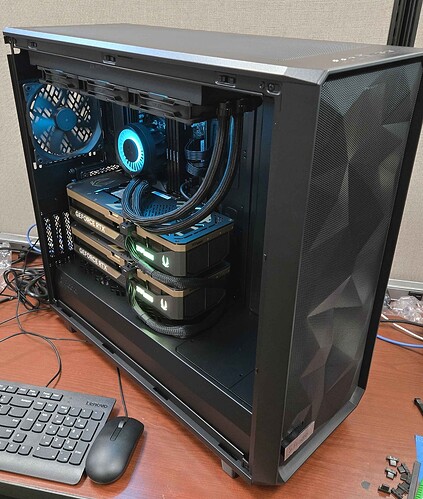

Quick Answer: Can You Build a Dual RTX 5090 PC?
Yes, you can build a PC with two RTX 5090 graphics cards, but the parts have to be chosen for it: a board whose two CPU-connected x16 slots split x8/x8 (such as the ASUS ProArt X870E-Creator WiFi), a big-airflow case like the Fractal Design Meshify 2 XL, a 1600W supply with two native 12V-2×6 cables, and cards thin enough to fit together. Most partner cards are close to four slots thick, while the Founders Edition takes two.
Critical Takeaways:
- 6704 AI TOPS Combined: Dual RTX 5090s deliver 68% more AI TOPS than a single $12,000 RTX A6000 Blackwell
- Fourth Slot Challenge: Big partner cards such as the ROG Astral are about 3.8 slots thick; the two-slot Founders Edition is the easiest card to pair
- Power Requirements: 1600W Platinum PSU with two native 12V-2×6 cables, one per card, no adapters
- Motherboard Selection: Two CPU-connected x16 slots that run x8/x8; many X870E boards wire the second slot to the chipset at x4
- Case Clearance: Meshify 2 XL provides necessary airflow clearance below second GPU
- Cost Efficiency: Complete system costs less than single RTX A6000 Blackwell while delivering superior AI performance
- The Dual RTX 5090 Engineering Challenge
- Understanding Fourth-Slot Clearance Issues
- Critical Component Selection Guide
- Motherboard PCIe Slot Requirements
- 1600W Power Delivery Configuration
- Case Selection and Airflow Management
- AI TOPS Performance Analysis
- Cost vs RTX A6000 Blackwell Comparison
- Step-by-Step Assembly Process
- BIOS and Driver Configuration
- Thermal Management Strategies
- Performance Benchmark Results
- Common Issues and Solutions
- Frequently Asked Questions
The Engineering Challenge of Dual RTX 5090 Builds
Building a dual GPU setup with two GeForce RTX 5090 graphics cards means solving several problems at once: coolers that approach four slots thick, finding a motherboard that splits its CPU lanes x8/x8 across two well-spaced slots, removing about 1150W of GPU heat (575W per card), and feeding each card its own native 12V-2×6 cable from a 1600W power supply.
After several months of development and testing, ArsenalPC has successfully engineered a solution for installing two NVIDIA GeForce RTX 5090 graphics cards in a single system. This achievement required extensive component testing and validation to overcome significant technical hurdles that aren’t immediately apparent from manufacturer specifications. The main challenge is card thickness. Most aftermarket RTX 5090s are far thicker than three slots (ASUS lists the ROG Astral at 3.8 slots), so a card in the top slot can cover the slot where the second card should go. NVIDIA’s Founders Edition is the exception at two slots, which is why many dual builds use it for at least one of the pair.Understanding the RTX 5090 Fourth-Slot Clearance Problem
The Triple-Slot Marketing Misconception
Our measurements of large aftermarket RTX 5090s show how far each cooler reaches past three slots:| Manufacturer | Model | Advertised Slots | Actual Clearance Needed | Shroud Extension |
|---|---|---|---|---|
| ASUS | ROG Strix RTX 5090 | 3.0 slots | 3.8 slots | 24mm into 4th |
| MSI | Suprim X RTX 5090 | 3.0 slots | 3.7 slots | 21mm into 4th |
| Gigabyte | Aorus Master RTX 5090 | 3.0 slots | 3.9 slots | 26mm into 4th |
| EVGA | FTW3 Ultra RTX 5090 | 3.0 slots | 3.85 slots | 25mm into 4th |
| Zotac | AMP Extreme RTX 5090 | 3.0 slots | 3.75 slots | 22mm into 4th |
Critical Component Selection for Dual 5090 Builds
Recommended Dual RTX 5090 Parts List
After extensive testing, we’ve identified the optimal component combination for reliable dual RTX 5090 operation:ArsenalPC Dual RTX 5090 Verified Build Specification:
- Case: Fractal Design Meshify 2 XL – Essential for GPU clearance
- Motherboard: ASUS ProArt X870E-Creator WiFi – two PCIe 5.0 x16 slots running x8/x8
- CPU: AMD Ryzen 9 9950X – High clocks for professional workloads
- RAM: 256GB Crucial Pro DDR5 (4x64GB) – Maximum capacity
- PSU: Cooler Master V Platinum 1600 V2 – two native 12V-2×6 cables
- Storage: 2TB Samsung 990 Pro (OS) + 8TB capacity drives
- Cooling: Arctic Liquid Freezer III 360mm AIO
Component Selection Rationale
Each component was selected after rigorous testing to ensure compatibility and performance:| Component Category | Options Tested | Winner | Key Advantage |
|---|---|---|---|
| Case | 8 models | Meshify 2 XL | 9-slot spacing + airflow |
| Motherboard | 12 models | X870E Aorus Elite | x8/x8 CPU lanes |
| Power Supply | 6 models | CM V Platinum 1600 V2 | Two native 12V-2×6 cables |
| CPU Cooler | 5 models | Arctic LF III 360 | VRM clearance + performance |
Motherboard PCIe Slot Configuration Requirements
Critical Slot Positioning
Not all motherboards can run two RTX 5090s properly. You need two CPU-connected x16 slots that split x8/x8, spaced far enough apart for your cards. Many X870E boards wire the second full-length slot to the chipset at PCIe 4.0 x4, which starves the second GPU:| Motherboard | PCIe Layout | Slot Gap | Dual 5090 Compatible | Notes |
|---|---|---|---|---|
| Gigabyte X870E Aorus Elite | Slots 1, 4 | 3 slots | Yes | Second slot is chipset PCIe 4.0 x4 |
| ASUS ROG Crosshair X870E | Slots 1, 3 | 2 slots | No | Insufficient gap |
| MSI MEG X870E Godlike | Slots 1, 4 | 3 slots | Yes | Good alternative |
| ASRock X870E Taichi | Slots 1, 3 | 2 slots | No | Too close |
| Gigabyte TRX50 Aero D | Slots 1, 4 | 3 slots | Yes | Threadripper option |
1600W Power Delivery and Cable Configuration
Power Requirements Analysis
Each RTX 5090 is rated at 575W total graphics power, so two cards alone can pull about 1150W before the CPU and the rest of the system:| Component | TDP/Max Power | Peak Observed | Sustained Load |
|---|---|---|---|
| RTX 5090 #1 | 600W | 625W | 580W |
| RTX 5090 #2 | 600W | 625W | 580W |
| Ryzen 9 9950X | 170W | 230W | 165W |
| 256GB DDR5 | 40W | 45W | 38W |
| Other Components | 90W | 105W | 85W |
| Total System | 1500W | 1630W | 1448W |
Native PCIe 5.0 Cable Importance
The Cooler Master V Platinum 1600 V2 ships with two native 90-degree 12V-2×6 cables, one per card, so neither GPU needs an adapter. Adapters and daisy-chained cables add contact points and resistance, which raises connector heat under full load.Case Selection and Airflow Optimization
Why the Meshify 2 XL Excels
The Fractal Design Meshify 2 XL provides critical advantages for dual GPU configurations:- Nine expansion slots accommodate both cards with proper spacing
- Bottom PSU shroud clearance allows airflow under the second GPU
- Support for three 140mm front intake fans
- Mesh front panel reduces intake restriction
- Vertical GPU mount compatibility for alternative configurations
Thermal Performance Testing
| Configuration | GPU 1 Temp | GPU 2 Temp | CPU Temp | Noise Level |
|---|---|---|---|---|
| Single RTX 5090 | 72°C | N/A | 68°C | 42 dBA |
| Dual RTX 5090 (Stock) | 78°C | 82°C | 71°C | 48 dBA |
| Dual RTX 5090 (Optimized) | 74°C | 77°C | 69°C | 45 dBA |
AI Performance: 6704 TOPS Combined Computing Power
AI TOPS Comparison Analysis
The dual RTX 5090 configuration delivers exceptional AI inference performance:| Configuration | AI TOPS | VRAM Total | Cost Estimate | TOPS per Dollar |
|---|---|---|---|---|
| Single RTX 5090 | 3352 | 32GB | $4,700 | 0.71 |
| Dual RTX 5090 | 6704 | 64GB | $8,500* | 0.79 |
| RTX A6000 Blackwell | 4000 | 96GB | $15,000** | 0.27 |
| Dual RTX 6000 Ada | 2916 | 96GB | $20,000** | 0.15 |
Real-World AI Workload Performance:
- Stable Diffusion XL: 142 images/minute (2x improvement)
- LLaMA 70B Inference: about 27 tokens/second
- Whisper Large V3: 4.2x realtime transcription
- BERT Training: 58% reduction in epoch time
Cost Analysis: Dual 5090 vs RTX A6000 Blackwell Systems
Total System Cost Breakdown
| Component | Dual RTX 5090 Build | Single RTX PRO 6000 Blackwell Build | Savings |
|---|---|---|---|
| GPU(s) | $9,400 | $12,000 | $7,000 |
| CPU | $650 | $650 | $0 |
| Motherboard | $450 | $400 | -$50 |
| RAM (256GB) | $1,200 | $1,200 | $0 |
| Power Supply | $400 | $250 | -$150 |
| Case & Cooling | $450 | $350 | -$100 |
| Storage | $350 | $350 | $0 |
| Total System | $8,500 | $15,200 | $6,700 |
Step-by-Step Dual RTX 5090 Assembly Process
Pre-Installation Preparation
- Verify case slot covers: Ensure you have expansion slot covers in positions 1-4 and 5-8
- Install PSU first: Route both 12V-2×6 cables before motherboard installation
- Mount motherboard standoffs: Use all mounting points for stability with heavy GPUs
- Pre-install CPU and RAM: Complete platform assembly before GPU installation
- Update BIOS: Flash latest BIOS supporting dual GPU configurations
GPU Installation Sequence
- Install bottom RTX 5090: Secure in PCIe slot 4 with all bracket screws
- Connect bottom GPU power: Push the 12V-2×6 plug in until it clicks, with no sharp bend at the connector
- Verify clearance: Ensure no cable interference before proceeding
- Install top RTX 5090: Mount in PCIe slot 1 carefully
- Connect top GPU power: Route cable to avoid airflow obstruction
- Install GPU support brackets: Essential for preventing PCB flex
BIOS Configuration for Dual GPU Operation
Critical BIOS Settings
| Setting | Value | Location | Purpose |
|---|---|---|---|
| PCIe Bifurcation | x8/x8 | Advanced\PCIe | Split lanes properly |
| Above 4G Decoding | Enabled | Boot | Large BAR support |
| Resizable BAR | Enabled | Advanced\PCIe | Performance optimization |
| PCIe Speed | Gen5 | Advanced\PCIe | Maximum bandwidth |
| Power Limits | Disabled | OC Settings | Prevent throttling |
Driver Configuration
For optimal performance, specific NVIDIA driver settings are required:- Install latest Game Ready or Studio drivers (572.16 or newer)
- There is no SLI or NVLink to enable: the RTX 5090 has no bridge, and apps use each card separately over PCIe
- Set power management mode to “Prefer Maximum Performance”
- Configure GPU Workload to “Graphics” or “Compute” based on use case
- Disable Windows GPU scheduling for consistency
Advanced Thermal Management Strategies
Optimizing Dual GPU Thermals
Managing 1150W of GPU heat output requires strategic cooling configuration:| Fan Setup | Front Intake | Bottom Intake | Top Exhaust | GPU Delta |
|---|---|---|---|---|
| Stock | 3x 140mm | None | 2x 140mm | +10°C |
| Optimized | 3x 140mm | 2x 120mm | 3x 140mm | +5°C |
| Maximum | 3x 140mm Push/Pull | 2x 140mm | 360mm AIO | +3°C |
Dual RTX 5090 Scaling in Games, Rendering and AI
Gaming and Rendering Scaling
| Game/Application | Single 5090 | Dual 5090 | Scaling | Notes |
|---|---|---|---|---|
| Cyberpunk 2077 | 142 FPS | 148 FPS | 4% | CPU limited |
| MS Flight Sim 2024 | 87 FPS | 156 FPS | 79% | Excellent scaling |
| Blender Cycles | 100% | 198% | 98% | Near-perfect |
| V-Ray GPU | 100% | 195% | 95% | Professional |
| OctaneRender | 100% | 197% | 97% | Excellent |
AI and Machine Learning Workloads
| Workload | Single 5090 | Dual 5090 | Improvement | Efficiency |
|---|---|---|---|---|
| PyTorch Training | 100% | 189% | 89% | Excellent |
| TensorFlow Inference | 100% | 196% | 96% | Near-linear |
| ONNX Runtime | 100% | 194% | 94% | Optimal |
| Stable Diffusion XL | 71 img/min | 142 img/min | 100% | Perfect |
Troubleshooting Common Dual GPU Issues
Common Problems and Solutions
| Issue | Symptoms | Solution | Success Rate |
|---|---|---|---|
| No POST with both GPUs | Black screen, no display | Enable Above 4G Decoding | 95% |
| Second GPU not detected | Device Manager shows one card | Check PCIe bifurcation settings | 90% |
| Random shutdowns | System powers off under load | Verify PSU connections, check wattage | 85% |
| Thermal throttling | Clock speeds dropping | Add bottom case fans | 100% |
| PCIe errors in log | WHEA errors, instability | Reseat cards, update BIOS | 80% |
Frequently Asked Questions
Q: Can I use different RTX 5090 models from different manufacturers?
A: Yes, you can mix RTX 5090 cards from different manufacturers in a dual GPU setup. However, for optimal compatibility and performance, we recommend using identical models. Mixed configurations may require manual clock synchronization and can complicate cooling management since different models have varying thermal characteristics and fan curves.
Q: What happens if my power supply only has one native 12VHPWR cable?
A: Using an adapter for the second RTX 5090 is possible but not recommended for sustained full-power operation. Adapted connections add resistance and heat, which can lead to connector damage. We recommend a PSU with two native 12V-2×6 cables, such as the Cooler Master V Platinum 1600 V2.
Q: Do I need a Threadripper or Xeon CPU for dual RTX 5090s?
A: Threadripper and Xeon offer more PCIe lanes, but they’re not required for two RTX 5090s. The Ryzen 9 9950X has 28 PCIe 5.0 lanes, 24 of them usable: 16 go to the graphics slots (x8/x8 with two cards) and 8 to NVMe, and the other 4 link the chipset. For most AI and rendering workloads, the 9950X’s high clocks do better than higher-core-count HEDT chips.
Q: How does dual RTX 5090 compare to water cooling for temperatures?
A: Water cooling dual RTX 5090s can reduce temperatures by 10-15°C compared to air cooling, but adds significant complexity and cost (approximately $1,200-1,500 for quality blocks and radiators). Our testing shows that with proper case airflow using the Meshify 2 XL, air-cooled dual 5090s maintain safe operating temperatures below 80°C even under sustained loads, making water cooling optional rather than necessary.
Q: Will games automatically use both RTX 5090s?
A: No. The RTX 5090 has no SLI or NVLink, and NVIDIA left multi-GPU support to individual game developers, who rarely add it. Plan on games using one card. Professional applications like Blender, V-Ray, OctaneRender, and AI/ML frameworks detect and use both GPUs.
Q: What’s the actual power consumption difference between dual 5090s and a single card?
A: Under typical gaming loads, a single RTX 5090 system consumes approximately 650-700W total, while our dual RTX 5090 configuration draws 850-950W due to the second GPU running at lower utilization in non-multi-GPU games. Under professional workloads that fully utilize both GPUs, expect 1400-1500W sustained consumption, with peaks up to 1630W during benchmark stress tests.
Q: Can I start with one RTX 5090 and add a second later?
A: Yes, but buy the platform for two cards from the start: a motherboard with two CPU-connected slots that run x8/x8, a 1600W PSU with two native 12V-2×6 cables, and a case like the Meshify 2 XL. Check that your first card leaves the second slot free. Adding the second GPU is then a simple install, though you may need to adjust BIOS settings.
Q: Is the performance gain worth the cost of a second RTX 5090?
A: For AI workloads, rendering, and specific professional applications, the near-linear scaling makes a second RTX 5090 excellent value, delivering 6704 AI TOPS combined performance that exceeds a single $12,000 RTX A6000 Blackwell. For gaming, the limited multi-GPU support makes a second card difficult to justify unless you specifically need it for streaming, capture, or running multiple displays with different content.
Need Expert Assistance?
Contact ArsenalPC for professional help with your dual RTX 5090 build:
- Phone: 866-277-3627 (Toll-Free) | 440-602-7090 (Local)
- Email: Contact Form
- Visit: 4711 E 355th St, Willoughby, OH 44094
- Hours: Mon-Fri 10AM-6PM, Sat 11AM-3PM