

Last Updated: February 2026 | Author: ArsenalPC Technical Team | Reading Time: ~11 minutes
Quick Answer: What PSU wattage do I need for my gaming PC in 2026?
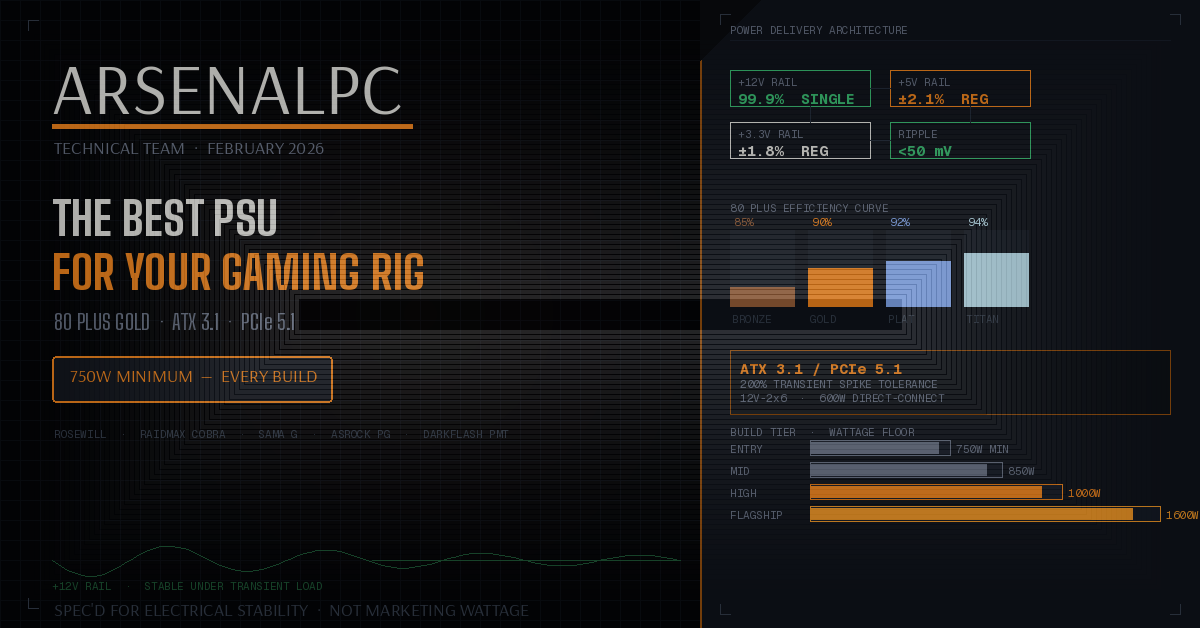
If you’re running RTX 5070–5080 class hardware, 850W–1000W 80 Plus Gold ATX 3.1 is the practical sweet spot. For RTX 5090 or dual-GPU builds, size up to 1200W–1600W. At ArsenalPC, 750W is our minimum across every build we ship because we spec for upgrade headroom and transient stability, not just today’s average power draw.
What You’ll Learn
- What 80 Plus actually measures: Efficiency only, not overall PSU quality.
- Which specs matter most: Voltage regulation, ripple suppression, and protection behavior.
- Why ATX 3.1 is a real requirement: Modern GPU transient spikes can shut down older platforms.
- How to pick wattage by tier: Entry, mid-range, high-end, and flagship sizing guidance.
- What to look for in PCIe 5.1: Native 12V-2×6 support and proper cabling.
- Common PSU mistakes to avoid: The errors that cause reboots, black screens, and instability.
- Why the PSU Matters More Than Most People Think
- What 80 Plus Actually Measures and What It Does Not
- 80 Plus Efficiency Table at 115V
- The Specs That Actually Determine PSU Quality
- ATX 3.1 and PCIe 5.1: What They Mean for Gaming PCs
- How Much Wattage Do You Actually Need?
- The 50–75% Rule for Stability and Efficiency
- The PSU Lineup We Build With and What We Can Verify
- Common PSU Mistakes That Hurt Good Builds
- FAQ: PSU Sizing for Gaming PCs
- Need Expert Assistance?
- Additional Resources
- Disclaimers
Why the PSU Matters More Than Most People Think
Your power supply is the one component that connects to every other part of your PC. Undersize it or choose a weak platform and you can get crashes, black screens, corrupted data, and instability that looks like a GPU or driver problem. This guide explains what PSU specs actually matter and how to size wattage correctly for modern GPUs.
Most gamers obsess over the GPU, CPU, and RAM. Ask what PSU is in the system and you often get a blank stare. That is a problem because the PSU defines electrical stability under load: the exact moment when your CPU and GPU are both working hardest.
What 80 Plus Actually Measures and What It Does Not
One of the most common buying mistakes is treating 80 Plus certification as a complete quality rating. 80 Plus measures one thing: electrical efficiency. It tells you how much of the wall power (AC) gets converted into usable DC power for your components. The rest is lost as heat.
80 Plus does not measure voltage regulation, ripple suppression, protection circuit calibration, fan noise, or long-term platform reliability. Two Gold units can behave very differently depending on the underlying OEM platform and electrical design.
80 Plus Efficiency Table at 115V
| Rating | @ 20% Load | @ 50% Load | @ 100% Load |
|---|---|---|---|
| 80 Plus White | 80% | 80% | 80% |
| 80 Plus Bronze | 82% | 85% | 82% |
| 80 Plus Gold | 87% | 90% | 87% |
| 80 Plus Platinum | 90% | 92% | 89% |
| 80 Plus Titanium | 90% | 94% | 90% |
The Specs That Actually Determine PSU Quality
Engineers evaluate the PSU using electrical behavior under load, not just an efficiency badge. These are the core quality signals called out in our checklist.
Voltage Regulation
Voltage regulation describes how tightly the PSU holds the 12V, 5V, and 3.3V rails as load changes. The ATX spec allows ±5%. Quality units commonly stay within ±2–3%. Loose regulation can show up as instability during CPU-heavy scene transitions, shader compilation, and multi-threaded workloads.
Ripple Suppression
Ripple is AC noise riding on a DC rail, measured in millivolts. ATX spec allows up to 120mV on the 12V rail. Well-built units often stay under ~50–60mV. High ripple can increase component stress over time and cause unexplained reboots under sustained GPU load.
Protection Circuits
Protection features like OVP, UVP, OCP, SCP, and OTP exist on paper across many PSUs, but calibration quality varies. Protection that triggers too easily creates nuisance shutdowns. Protection that triggers too late does not protect hardware.
OEM Platform Matters
A retail brand is not always the manufacturer. The underlying OEM platform determines real-world behavior. Platforms commonly cited as well-regarded include Seasonic, Super Flower, CWT, Delta, FSP, and Flextronics when confirmed for a given unit.
ATX 3.1 and PCIe 5.1: What They Mean for Gaming PCs
Modern GPUs draw power in brief spikes that can exceed sustained draw by a large margin. ATX 3.1 compliance is designed for this reality.
Why ATX 3.1 Matters
- Transient spike handling: ATX 3.1 requires the PSU itself to ride through power excursions of up to 200% of its own rated output for up to 100 microseconds without shutting down.
- Fewer “mystery” crashes: Non-compliant units may trigger protection shutdowns mid-session, appearing as black screens or instant power-offs.
- Cleaner high-power cabling: PCIe 5.1’s native 12V-2×6 connector supports up to 600W direct delivery and reduces reliance on adapters.
How Much Wattage Do You Actually Need?
Online wattage calculators frequently inflate recommendations toward theoretical maximums. Our sizing approach uses practical tiers and aims for stable transient headroom.
Entry Builds
For RTX 5050 or RX 9060 XT class hardware, the GPU is rated at about 130W (RTX 5050) to 160W (RX 9060 XT 16GB), and NVIDIA recommends 550W of system power for the RTX 5050. On paper, 550–650W covers the math. At ArsenalPC, we ship 750W minimum anyway to preserve upgrade headroom and keep the PSU operating in a more efficient, stable range.
Mid-Range Builds
For RTX 5070 and RTX 5070 Ti class builds, 850W is our target, above NVIDIA’s 650W (RTX 5070, 250W) and 750W (RTX 5070 Ti, 300W) system recommendations. ATX 3.1 compliance is non-negotiable at this tier because transient spikes become more relevant.
High-End Builds
For RTX 5080 class builds, the practical range often lands around 1000W, especially when paired with high-core-count CPUs like Ryzen 9 class parts. NVIDIA’s floor for the 360W RTX 5080 is 850W, but a Ryzen 9 9950X (up to 230W) or Core Ultra 9 285K (up to 250W) uses up that headroom quickly under simultaneous load.
Flagship and Workstation Builds
For RTX 5090 or dual-GPU builds, plan for 1200W–1600W. The RTX 5090 alone is rated at 575W and NVIDIA’s minimum is 1000W, so a 1000W unit is already near 58% load from the GPU alone. In dual-GPU scenarios, sustained combined pull makes headroom essential, not optional.
The 50–75% Rule for Stability and Efficiency
A practical sizing rule is to target a PSU where expected sustained system load is roughly 50–75% of rated capacity. That range generally aligns with strong efficiency behavior and leaves margin for transient spikes. Avoid running a PSU at 90–95% sustained capacity for long periods: that can accelerate aging and reduce protection margin.
How to Estimate Your Own System's Power Draw
Add the GPU's rated board power to the CPU's maximum power limit, then allow roughly 75W for the motherboard, memory, storage, and fans. For example, an RTX 5080 (360W) with a Core Ultra 9 285K (up to 250W maximum turbo power) comes to about 685W under full combined load.
On a 1000W unit that is about 69% load, inside the 50–75% band. On an 850W unit it is about 81%, which works but leaves little room for spikes or a bigger GPU later. Gaming rarely pushes the CPU to its full limit, so real gaming draw is usually lower than this worst case. Size for the worst case anyway.
The PSU Lineup We Build With and What We Can Verify
Our build philosophy is simple: we size for electrical stability first, upgrade headroom second, and marketing wattage not at all. Every unit we use is selected against a baseline checklist:
- 80 Plus Gold certification
- ATX 3.1 compliance for modern GPU transient behavior
- PCIe 5 / 5.1 readiness with native 12V-2×6 support where applicable
- 100% Japanese electrolytic capacitors
- Active PFC
- Full protection suite: OVP, UVP, OCP, SCP, OTP
- Fully modular cabling
Entry Tier: 750W Minimum
Rosewill CMG / RAIDMAX Cobra: These are spec’d to our baseline checklist. Rosewill lists the CMG5 as ATX 3.0 and 3.1 compatible with a native 600W 12V-2×6 connector and 100% Japanese capacitors. We have not seen a published teardown confirming the OEM platform for the current series.
Mid Tier: 850W and 1250W
Rosewill CMG / darkFlash PMT1250: The PMT1250 is listed with ATX 3.1 and PCIe 5.1 support and 100% Japanese 105°C capacitors. darkFlash’s global product page gives a 7-year warranty on the 1050W and 1250W models, but its US page and US retail listings show 5 years, so check the terms where you buy. No published teardown confirms the OEM platform.
High-End Tier: 1000W
SAMA G1000: SAMA is itself an OEM/ODM manufacturer. The G1000 carries 80 Plus Gold and Cybenetics Platinum dual certification, ATX 3.1, a native 600W PCIe 5.1 12V-2×6 cable, Japanese capacitors, a 140mm FDB fan, a 5-year warranty, and a compact 150mm depth.
Flagship Tier: 1600W
ASRock Phantom Gaming PG-1600G: OEM confirmed as FSP per Tom’s Hardware’s teardown review. Key specs include ATX 3.1, PCIe 5.1, and a 10-year warranty. At 180 x 150 x 86mm it is notably longer than a standard ATX unit, so verify case clearance.
Common PSU Mistakes That Hurt Good Builds
- Undersizing for your GPU tier: A PSU that “works” at idle can still fail under transient spikes or sustained combined loads.
- Confusing efficiency with platform quality: Two Gold units can differ meaningfully in ripple, regulation, and protection behavior.
- Skipping modular cabling: Fixed cable bundles complicate builds and work against airflow and aesthetics.
- Not sizing for the next GPU: A PSU swap later means re-cabling a fully assembled system. Avoidable if you size one tier up now.
FAQ: PSU Sizing for Gaming PCs
Q: Is 750W enough for an RTX 5070?
A: Yes. NVIDIA rates the RTX 5070 at 250W and recommends 650W of system power, so a quality ATX 3.1 750W unit covers it with margin. We still favor 850W for RTX 5070 class builds to preserve margin with high-core-count CPUs and future upgrades, while maintaining stability under transient behavior.
Q: What are the RTX 5080 power requirements?
A: NVIDIA rates the RTX 5080 at 360W and recommends at least 850W of system power. We position 1000W as a practical target for RTX 5080 class builds, especially when paired with high-core-count CPUs where combined load can close headroom quickly.
Q: Does ATX 3.1 matter for a gaming PC?
A: Yes for modern GPUs that exhibit sharp transient spikes. ATX 3.1 is designed to handle those spikes without nuisance shutdowns that look like driver crashes or black screens.
Q: What does 80 Plus Gold tell me and what does it not tell me?
A: It tells you efficiency at defined load points. It does not validate regulation, ripple, protection calibration, noise, or platform reliability. Treat it as one metric, not a full quality grade.
Q: Why does ArsenalPC use a 750W minimum even for entry builds?
A: The policy is based on upgrade headroom and stable operating range: a 750W unit keeps typical loads closer to the optimal band while leaving margin for future GPU upgrades without forcing a PSU replacement.
Q: What is the 12V-2×6 connector and why should I care?
A: It is the native high-power GPU connector associated with PCIe 5.1 cabling, intended for up to 600W delivery without relying on adapters. Native cabling reduces contact-point issues, but it is not a cure: melted 12V-2×6 connectors kept being reported on RTX 5090 cards through 2026, including power-limited cards and PSUs with temperature-sensing cables. Push the plug in fully, avoid sharp bends near it, and check it after the first few gaming sessions.
Need Expert Assistance?
Need Expert Assistance?
Contact ArsenalPC for help choosing the right ATX 3.1 PSU tier for your GPU and upgrade plans:
- Phone: 866-277-3627 (Toll-Free) | 440-602-7090 (Local)
- Email: Contact Form
- Visit: 4711 E 355th St, Willoughby, OH 44094
- Hours: Mon-Fri 10AM-6PM, Sat 11AM-3PM
Additional Resources
- ArsenalPC Support Portal
- Custom PC Builder
- Browse Pre-Built Gaming PCs
- See Current Deals
- Warranty & Support Information
Disclaimers
Disclaimer: PSU recommendations depend on full system configuration, GPU/CPU pairing, and real workload characteristics. Always verify case PSU clearance for longer units and ensure proper seating of high-power GPU connectors.
Affiliate Disclosure: This article contains no affiliate links. All recommendations are based on professional experience and internal spec standards.