

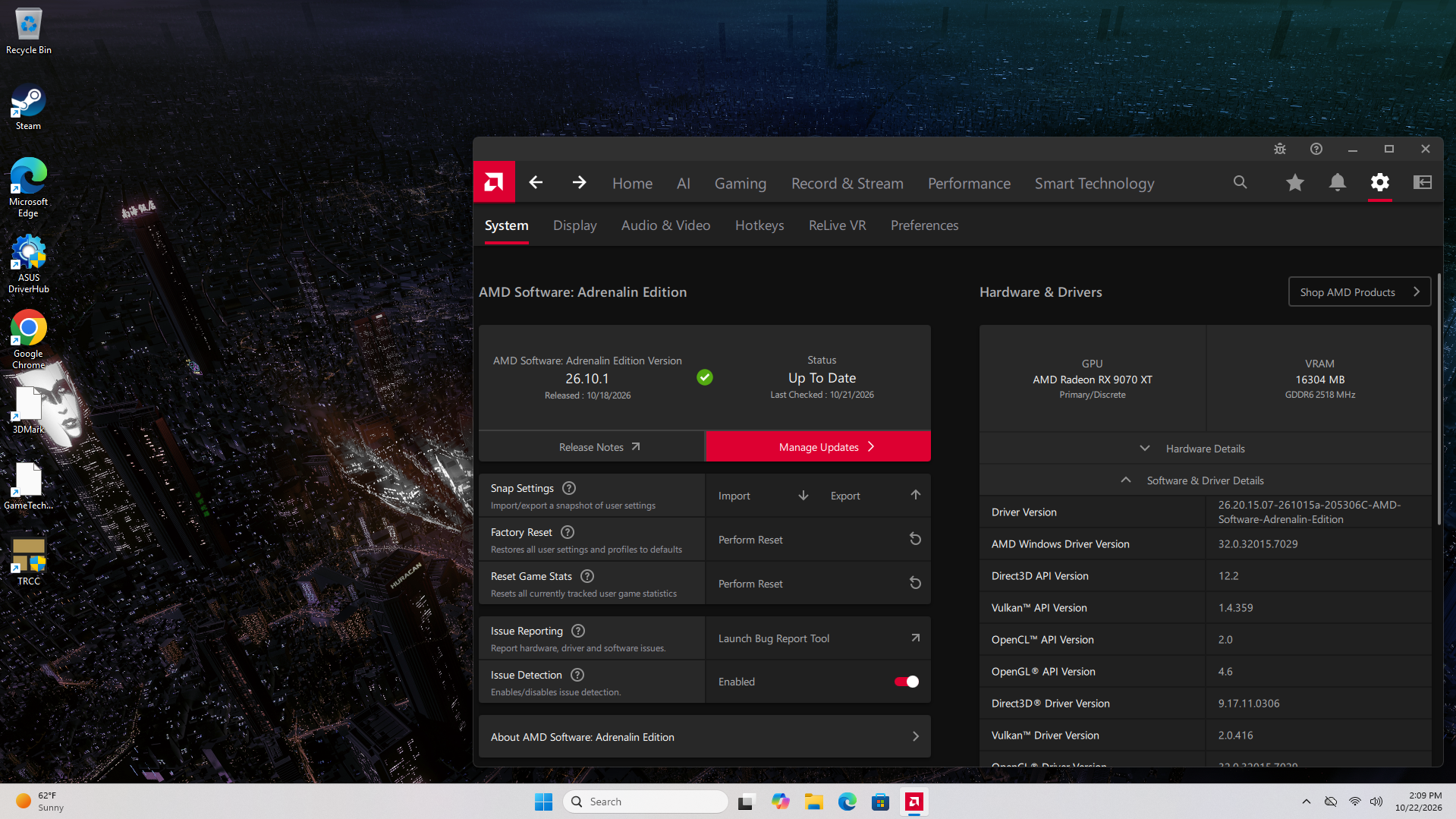
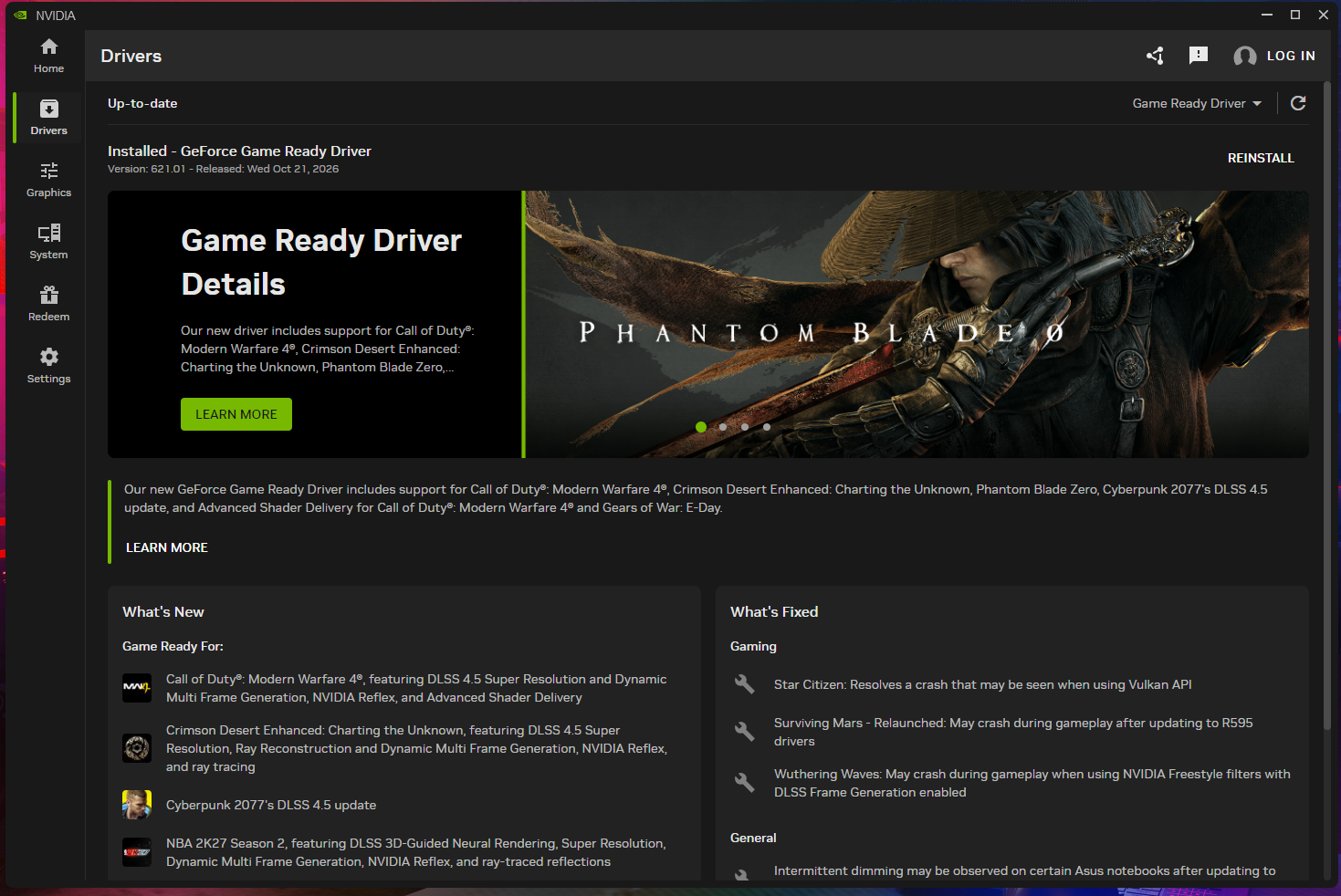
To update an AMD driver, open AMD Software: Adrenalin Edition and install the latest release. That’s Adrenalin 26.10.1, dated October 20, 2026. It adds Call of Duty: Modern Warfare 4 support and fixes stutter in that game on RX 6000 and newer cards. NVIDIA owners use the NVIDIA App, and Intel owners use Driver & Support Assistant.
For a normal update within the same brand, install over the top. You only need a clean DDU install for brand swaps, failed installs and downgrades. Roll Back Driver undoes one bad update. Windows keeps only one previous version, so it works once and only while that old package is still on the drive.
Before you update: check your GPU and where its driver should come from
Open Device Manager and note your exact GPU model and the driver version it runs now. The steps:
- Open Device Manager: right-click Start and choose Device Manager.
- Expand Display adapters: the GPU model is listed here. Systems with integrated graphics also show the iGPU.
- Check the version: right-click the GPU, choose Properties, then open the Driver tab. Write the version down so you have a target if you roll back later.
Laptops, all-in-ones and handhelds follow a different rule. AMD tells laptop and all-in-one owners to use the OEM’s driver, because the system maker customizes and validates those builds. Adrenalin doesn’t support handheld gaming devices at all, so handheld owners should get drivers from the device maker. Desktop owners can use the vendor tools: Adrenalin, the NVIDIA App or Intel’s Driver & Support Assistant.
How to update AMD drivers in Adrenalin
Run AMD’s Auto-detect and Install tool or the update check inside Adrenalin. AMD’s release notes say you need Administrator rights to install the driver. Adrenalin 26.10.1 runs on 64-bit Windows 10 and Windows 11, version 21H2 or later for both. You have three ways to update:
- Auto-detect and Install: AMD calls this tool the preferred method. Download it from AMD’s support site and run it. It picks the correct driver for your GPU.
- Adrenalin update check: open AMD Software, check for updates and install the recommended release. This is the quickest path once Adrenalin is installed.
- Manual download: select your card on AMD’s drivers page and run the full installer. Use this when you need one specific version.
After the install, open AMD Software and check your settings. AMD lists a known issue with optional driver 26.9.1: it can disable Smart Access Memory on Windows 10. Make sure SAM is still on, and reapply any undervolt or fan curve the update reset.
How to update NVIDIA drivers in the NVIDIA App
Update through the NVIDIA App after you close your monitoring and tuning tools and let Windows Update finish. NVIDIA support says background apps and a running Windows Update can both make a driver install fail.
- Clear the background: exit Corsair iCUE, MSI Afterburner, RGB suites and overlays from the system tray. Then let any pending Windows updates finish.
- Install from the NVIDIA App: open the app, go to its drivers area and install the latest Game Ready or Studio driver. Choose the custom install if you want to control which components go on.
- Reapply your tuning: reopen Afterburner and check your undervolt or fan curve is still loaded.
If the install still fails, try the clean install option from NVIDIA’s support article first. If that also fails, or you’re coming from a Radeon card, use DDU.
How to update Intel Arc and integrated graphics drivers
Install Intel Driver & Support Assistant (DSA) and let it scan for updates, or download the package from Intel’s Download Center. The current release is Intel Graphics Driver 32.0.101.9150, dated October 2, 2026. It’s WHQL certified for Arc B-Series and A-Series cards and for Core Ultra processors with Arc Graphics.
DSA scans your PC for installed Intel drivers and available updates. Arc auto-updates need DSA installed, and they offer two choices: Download or Download and Install. We’d pick Download so you can review the update before it installs.
Arc software bugs tracked
Gamers Nexus, across 10 months of Arc software updates, reported November 2025.
Arc software has had a lot of bugs, so read the release notes before every Arc update.
When is a clean install with DDU worth it?
Use DDU only when a normal install can’t fix the problem. On a healthy system it gains you nothing. A NeatNetTricks review notes that DDU wipes custom resolutions, color profiles, per-game profiles and FreeSync or G-Sync toggles and adds a reboot into Safe Mode. Use DDU in these cases:
- Brand swap: you’ve moved from NVIDIA to AMD or the other way.
- Failed install: the installer errors out, and a clean install from the vendor tool didn’t fix it.
- Downgrade: community advice on NVIDIA’s forums says to uninstall first, because older installers aren’t guaranteed to work over newer drivers.
- Persistent crashes: you still get black screens or crashes after a rollback.
How to run DDU in Safe Mode step by step
Run DDU in Safe Mode with the internet unplugged, then install a driver you downloaded beforehand. Going offline stops Windows Update from installing its own driver while the system has none.
DDU needs .NET Framework 4.8 and runs on Windows 7 through 11. Download it from wagnardsoft.com and use the latest stable build listed there.
- Prepare: download the driver and make a backup or restore point. If the drive uses BitLocker, have the recovery key ready. You don’t need to uninstall the old driver first.
- Extract DDU locally: Riot Games support says to use a local folder such as the Desktop, never OneDrive or a network drive. Exclude that folder from your security software.
- Go offline: unplug Ethernet and turn off Wi-Fi.
- Boot into Safe Mode: use the usual Windows route at least once before you try DDU’s “Enable Safe Mode dialog” option. The developer warns that skipping that first try can leave you stuck in Safe Mode.
- Clean and restart: select your GPU vendor in DDU and click Clean and restart.
- Install and reconnect: install the driver you downloaded, restart, then reconnect to the internet.
The developer calls Safe Mode optional but highly recommends it. In normal mode, DDU has to run twice to match one Safe Mode pass.
How to roll back a GPU driver and keep Windows from undoing it
Roll Back Driver in Device Manager undoes one driver version, but only if the old package is still on the drive. Microsoft says you need administrator permissions to roll back a driver.
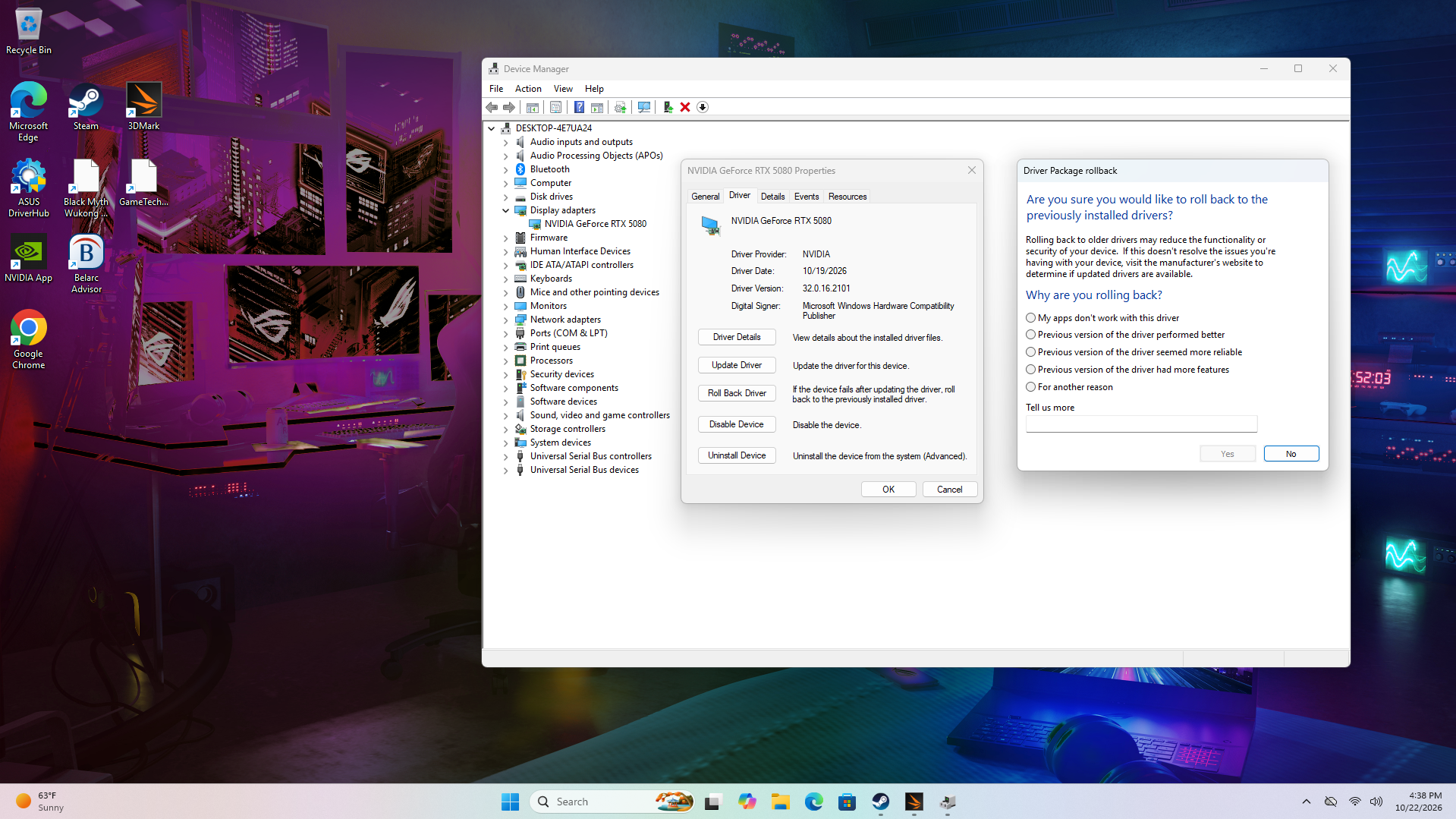
- Open the Driver tab: in Device Manager, right-click the GPU under Display adapters, choose Properties and open Driver.
- Roll back: click Roll Back Driver, pick a reason and restart.
- Confirm the version: compare it with the one you wrote down before you updated.
MemsTechTips notes that Windows keeps only one previous version. If Disk Cleanup has removed Device driver packages, the button is greyed out. NinjaOne says the same happens on a fresh install, where no previous driver exists. In either case, run DDU and install the previous version from AMD’s or NVIDIA’s driver archive.
In its 26.5.2 release notes, AMD listed crashes in Subnautica 2 and Marvel Rivals on RX 9000 cards and told affected users to install Adrenalin 26.3.1. That’s more than one version back, so Roll Back Driver can’t reach it. You’d run DDU first and then install 26.3.1 from AMD’s driver archive.
Microsoft says Windows Update installs video card drivers automatically. Intel warns it may install a driver older than the one you just put on. After a rollback, SolveTechToday suggests you exclude the device from Windows Update driver updates. Turn them back on once a stable release fixes your problem.
How often should you update your graphics driver?
Update when the release notes list your games, either as new support or as a fix for a problem you have. AMD’s release notes pages were updated for 8 driver versions between May 6 and October 20, 2026, or about one every three weeks.
Skip releases that only add features or games you don’t use. Before you install, read the known issues. If they list your card or a game you play, wait for the next release.
Need Help Choosing the Right PC?
ArsenalPC is based in Willoughby, Ohio with 27+ years of custom-build experience. Every system we ship is hand-assembled and stress-tested for a minimum of three hours before it leaves the shop, and our team is available to help you match the right configuration to your workload, display, and budget.
- Phone: 866-277-3627 (Toll-Free) | 440-602-7090 (Local)
- Email: Contact Form
- Visit: 4711 E 355th St, Willoughby, OH 44094
- Hours: Mon-Fri 10AM-6PM, Sat 11AM-3PM